Allen & Heath - XONE K3
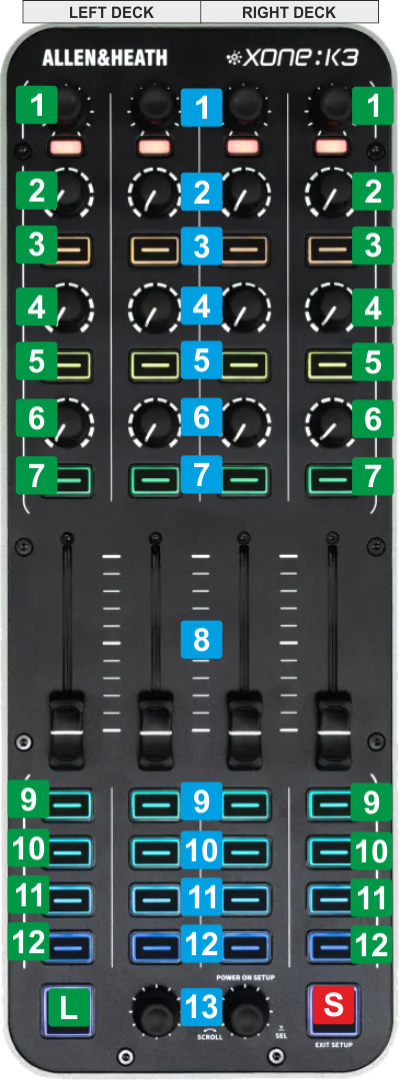
CONTROLS - 2 DECKS MODE
The following functionality is offered when the 2-Decks Controller-specific setting is selected (see
Advanced Setup ). This mode is the default mode when the Xone K3 is pulgged for the 1st time.
The left side of the Xone K3 offers controls for Left Deck and the right side controls for the Right Deck.
The top section (knobs and buttons) offers controls for EQ (
Stems ), Effects, Filter, Key and
Loop for the Left/Right Deck.
The bottom section (16 buttons) can be set to 2 different modes, as per the following tables.
KEY
ACTION
SHIFT (SECONDARY) ACTION
S SHIFTPress this button down to access secondary actions as described in the SHIFT ACTION column L LAYERToggle between Control+HCUES and PADS mode for the bottom buttons. 8 FADERThe 2 middle faders control the Volume of the Left/Right Deck. The outer faders are not assigned to any action in this 2-Decks mode. 13 SCROLLScroll through folders or Files depending on the focused Browser list.
When in Folders list, push to set focus to the Songs list, or long press to open/close sub-folders
When in Songs list:
- Push the Left Encoder to load the selected Track in Browser to Deck 1.
- Push the Right Encoder to load the selected Track in Browser to Deck 2
When bottom buttons are in PADS mode, hold LAYER button down for more than 1 second (led becomes purple as an indication) and then turn the Encoder to select previous/next Pads page for Left/Right Deck.
When bottom buttons are in Control+HCUES mode, hold LAYER button down for more than 1 second (led becomes purple as an indication) and then turn the Encoder to navigate through the loaded Track (seek) TOP INNER BUTTONS/KNOBS - Loop & EQ
KEY
ACTION
SHIFT (SECONDARY) ACTION
1 Loop When In Loop mode :
Rotate the Encoder to half/double the size of the Loop .
Push to enable/disable the selected Loop
When In Key mode :
Rotate the Encoder to adjust the Key of the Track by -1/+1 semitone on each step.
Push to reset and set Track's Key to its original value.
Push the Encoder to toggle between Loop mode (default - led becomes green) and Key mode (led becomes purple).
When in Loop mode and Loop is enabled, rotate to move the Loop forward/backwards by 1 Beat 2 EQ HIGHAdjust the High Equalizer Band or the selected Stem, depending on the EQ Mode 3 EQ HIGH KILLPush to kill/mute the High Equalizer Band or the selected Stem, depending on the EQ Mode 4 EQ MIDAdjust the Mid Equalizer Band or the selected Stem, depending on the EQ Mode 5 EQ MID KILLPush to kill/mute the Mid Equalizer Band or the selected Stem, depending on the EQ Mode 6 EQ LOWAdjust the Low Equalizer Band or the selected Stem, depending on the EQ Mode 7 EQ LOW KILLPush to kill/mute the Low Equalizer Band or the selected Stem, depending on the EQ Mode TOP OUTER BUTTONS/KNOBS - EFFECTS
KEY
ACTION
SHIFT (SECONDARY) ACTION
1 FILTER/FX SELECTWhen in Filter mode (default - led gets the Orange color), rotate to adjust the selected Color FX (Filter by default) of the Left/Right Deck.
Push to reset the Color FX at the center (off) position
When in FX Beats mode (led gets the Blue color), rotate to adjust the Beats Parameter of the FXs selected in FX Slots 1 to 3 (all together)
Push to reset Beats to 1 beat value.
When FX Select mode is enabled (led gets the Cyan color), rotate to scroll through the Effects list. Push to select the highlighted Effect for the FX SlotPush to toggle between Filter mode and FX Beats mode 2 FX1 PRMAdjust the 1st Parameter of the selected Effect on FX Slot 1 3 FX1 ONEnable/disable the selected Effect of FX Slot 1Enable the FX Select mode for FX Slot 14 FX2 PRMAdjust the 1st Parameter of the selected Effect on FX Slot 2 5 FX2 ONEnable/disable the selected Effect of FX Slot 2Enable the FX Select mode for FX Slot 26 FX3 PRMAdjust the 1st Parameter of the selected Effect on FX Slot 3 7 FX3 ONEnable/disable the selected Effect of FX Slot 3Enable the FX Select mode for FX Slot 3BOTTOM BUTTONS - CONTROL+HCUES MODE (default)
KEY
ACTION
SHIFT (SECONDARY) ACTION
9 PITCH BENDTemporary speed up Track's TempoTemporary slow down Track's Tempo 10 SYNCSync BPM and Phase with the other (or Master ) DeckGradually reset Track's tempo (BPM) to the original value 11 Cue Assign Temporary Cue when paused or return to the assigned position when playing and previews while pressedJumps to the beginning of the Track 12 PLAYPlays/pauses TrackPlay/stutter 9 H. Cue 1Assigns HotCue 1 to current position or jump to the assigned positionDeletes HotCue 1 10 H. Cue 2Assigns HotCue 2 to current position or jump to the assigned positionDeletes HotCue 2 11 H. Cue 3Assigns HotCue 3 to current position or jump to the assigned positionDeletes HotCue 3 12 H. Cue 4Assigns HotCue 4 to current position or jump to the assigned positionDeletes HotCue 4 BOTTOM BUTTONS - PADS MODE
KEY
ACTION
SHIFT (SECONDARY) ACTION
9-12 & 9-12 PADS 1 - 8Trigger Pads 1 to 8. Functionality depends on the selected Pads mode. See Pads in VirtualDJ Manual Functionality depends on the selected Pads mode. See Pads in VirtualDJ Manual


