


 Djaminhi
groovindj wrote :
Is anyone else noticing randomly placed markers that have a much different BPM to the track, or surrounding markers?
I see it most often for just one beat. If the track is c125 for example, there'll be the occasional beat marked as 104 or 149 or something completely off kilter.
Even when restricting the range, putting in e.g 124-126, it'll still place markers outside the range.
I've been having to check through tracks and remove them manually.
I see it most often for just one beat. If the track is c125 for example, there'll be the occasional beat marked as 104 or 149 or something completely off kilter.
Even when restricting the range, putting in e.g 124-126, it'll still place markers outside the range.
I've been having to check through tracks and remove them manually.
Yes
i have encountered this.
I am not too bothered as its beta; so im hoping this goes away....
geposted Sun 22 Feb 26 @ 4:10 pm
Djaminhi
https://www.instagram.com/djaminh1/reel/DU_GNkTDtpE/
Had a go at the AI visualization feature.....it was fairly accurate; but i think i asked it to do too much; and it didnt give me everything i asked for......but......not bad for a first time.....
How come we only get four tries per month?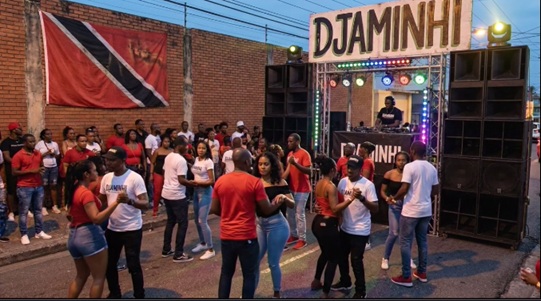
Had a go at the AI visualization feature.....it was fairly accurate; but i think i asked it to do too much; and it didnt give me everything i asked for......but......not bad for a first time.....
How come we only get four tries per month?
geposted Sun 22 Feb 26 @ 4:23 pm
 Niels (cph)
DJ VinylTouch wrote :
To correct this, in the BPM editor you could select anchors that give the wrong beat count, right click and shift the downbeat left or right for the local area until it is correct.
Ah yes, you are right. I can get a correct 2-beat bar by right clicking the beat I want to be the next x.1 and selecting “Shift local downbeat left”. But as you write I need to do it several times on the same beat until correct. And the feedback is not obvious.
It could be simpler. Maybe a new verb to make the beat closest to the play head first beat of the bar. Then you can map it to a shortcut key or button, and not have to open the BPM editor.
geposted Sun 22 Feb 26 @ 4:23 pm
 djdad
djdad
Niels (cph) wrote :
... I am playing around with Diana Ross Upside Down, and it gets the first downbeat wrong. This is perhaps to be expected, but I can’t figure out how to override it and set 1.1 explicitly.
The track starts with 2 beats of percussive guitar strumming before the band falls in at what should be 1.1.
The track starts with 2 beats of percussive guitar strumming before the band falls in at what should be 1.1.
Isnt the Cue 1 position in my image the "downbeat" ?

If you follow the Track, the 1st beat of each bar is where you usually hear the drum+snare
Niels (cph) wrote :
.. Another (related) issue is that several places in Upside Down there are 2–beat bars. It seems that it is not possible to mark a beat as “1st beat of bar” and continue with that phrasing until next override.
At which position (Elapsed Time) do you see this ? Or is this after some edit ?
btw, we ve seen difference in the Variable BPM algo, so will have to ask if this Track of yours comes from some known source (Tidal, Deezer etc) or a local file of yours
Overall Comment : Indeed there are some Tracks like the above, where the 1st beat of a bar might be in a different position as the one you hear, but why is that so important in mixing to get it right ? Isnt enough to get the Track properly beat-aligned ?
geposted Sun 22 Feb 26 @ 10:43 pm
 groovindj
I've just analysed it here, and it put the downbeat at the start, on the guitar part. I had to nudge it right twice to get it on the first kick.
geposted Sun 22 Feb 26 @ 11:00 pm
 djsadim
Stephane Clavel wrote :
Just on the heels of VirtualDJ 2026, comes VirtualDJ 2026 Part 2, introducing even more cutting-edge technology that continues to define the future of DJing:
VISUALS: Use the power of AI to fill your video display with amazing content when you're playing audio-only tracks.
You can use traditional audio-reactive mesmerizing patterns (Shaders), that can now be generated by the AI engine from simple descriptive prompts.
Or ask the AI to generate high quality beat-synced realistic or animated video loops (AiLoops), with no limit to your creativity....
VISUALS: Use the power of AI to fill your video display with amazing content when you're playing audio-only tracks.
You can use traditional audio-reactive mesmerizing patterns (Shaders), that can now be generated by the AI engine from simple descriptive prompts.
Or ask the AI to generate high quality beat-synced realistic or animated video loops (AiLoops), with no limit to your creativity....
- When switching from one video or shader to another, it would be useful to have the option to apply a transition effect between them, in order to achieve a smoother and more visually appealing result.
- When using the lyrics effect during mixing, and vocals are muted, the lyrics display should not follow the master deck, but instead follow the stems (pads, EQ mode, or effects).
This would allow the lyrics to better match the actual audio output, resulting in a more consistent and visually pleasing experience.
geposted Mon 23 Feb 26 @ 1:08 pm
groovindj
Update to my earlier post about the tiny tilde and padlock:
Initially I put VARIABLE text under the BPM of each deck, which was fine on my big 32" screen, but when I updated my laptop it became clear that it was too small for that screen size, so...
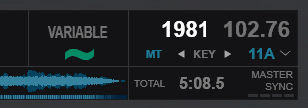
Now it's in the BPM editing area (which I never used) with a big green squiggle and large text.
Initially I put VARIABLE text under the BPM of each deck, which was fine on my big 32" screen, but when I updated my laptop it became clear that it was too small for that screen size, so...
Now it's in the BPM editing area (which I never used) with a big green squiggle and large text.
geposted Mon 23 Feb 26 @ 3:26 pm
Niels (cph)
djdad wrote :
Isnt the Cue 1 position in my image the "downbeat" ?
No, the first beat of first bar (1.1) is 2 beats before your cue point.
djdad wrote :
At which position (Elapsed Time) do you see this ? Or is this after some edit ?
At 0:36.9 there’s a 2-beat “transition bar”. The next full bar starts 2 beats later at 0:38.0 in the middle of the word “Instinctively”. Then there’s a section with normal bars, and again a 2-beat “transition bar”. This pattern repeats a number of times.
djdad wrote :
btw, we ve seen difference in the Variable BPM algo, so will have to ask if this Track of yours comes from some known source (Tidal, Deezer etc) or a local file of yours
This is a Tidal version (length 4:05). The browser “Filename” column shows “td87782159”.
Interestingly, if I switch to stable grid in the BPM editor, then it handles the first downbeat correctly. So, the first 2 beats are -1.3 and -1.4, and the third beat is 1.1.
djdad wrote :
Overall Comment : Indeed there are some Tracks like the above, where the 1st beat of a bar might be in a different position as the one you hear, but why is that so important in mixing to get it right ? Isnt enough to get the Track properly beat-aligned ?
It is important in order to get the phrase counter widget in the top to correctly show where we are in a 4-bar phrase. Of course you will mostly know this instinctively when listening, but now that we have a grid and UI elements that show good information, it should be correct.
I don’t expect the algorithm to get all tricky tracks correct, but it should be easy to manually correct. In many tracks it will only be the 1.1 beats that needs correction, and in a few tracks there are some breaks and irregular bars that should be fixable by manually designating the next 1-beat.
geposted Mon 23 Feb 26 @ 5:50 pm
groovindj
I found this video (it shows the 2/4 sections on the sheet music):
geposted Mon 23 Feb 26 @ 5:58 pm
Niels (cph)
Ahh, nice find @groovindj 👍🏻🎼🎶
geposted Mon 23 Feb 26 @ 6:03 pm
 DJ Faber Zee
It's so incredible to see how VDJ community is working hard on this (and not only on this)...keep it up ❤️
geposted Mon 23 Feb 26 @ 6:06 pm
 DJ VinylTouch
@DJ Faber Zee it's one of the best things about being a VirtualDJ user - the devs listen/are responsive with updates, and community users genuinely want to see people/the product succeed.
Atomix doesn't get much influencer help to get the word out about/be helpful for VirtualDJ, but if we can get the forum being as welcoming/helpful/responsive as possible, in time, that kind of help wouldn't be a requirement/the default place to go, it would more be icing on the cake/a nice to have.
Community and group unity/help is the greatest influencer.
Atomix doesn't get much influencer help to get the word out about/be helpful for VirtualDJ, but if we can get the forum being as welcoming/helpful/responsive as possible, in time, that kind of help wouldn't be a requirement/the default place to go, it would more be icing on the cake/a nice to have.
Community and group unity/help is the greatest influencer.
geposted Mon 23 Feb 26 @ 10:27 pm
 dj manos
When I disable the bpm_stabilizer option on the Master deck, the other decks do not follow the BPM, but the sampler does follow it correctly. Will this be possible in the future?
A nice improvement would be to have the red line (bpm fluctuation) on the <songpos> element in skin like in the BPM editor.
A nice improvement would be to have the red line (bpm fluctuation) on the <songpos> element in skin like in the BPM editor.
geposted Tue 24 Feb 26 @ 5:17 pm
djleods21
Subject: Keyboard shortcuts for BPM Stabilizer, Track Analysis, and Lyrics (Accessibility)
Hi everyone,
I’m DJ Leo, a blind DJ with over 17 years of experience. I use screen readers like NVDA and Jaws, so I rely heavily on keyboard shortcuts and MIDI mapping since the visual interface isn't always fully accessible for me.
I am testing Virtual DJ 2026 and I would like to know the specific VDJ Script commands or default keyboard shortcuts for the following:
* BPM Stabilizer: How can I toggle the new "BPM Stabilizer" (Fluid Beatgrid) and "Constant BPM" modes on/off for the active deck?
* Track Analysis: Is there a shortcut to trigger the analysis of the currently focused track in the browser or the one loaded on a deck?
* Lyrics: What is the command to toggle the Lyrics display on/off? This is very helpful for me when I need to provide a quick karaoke solution using the Stem separation features.
I would also like to add that I would love for you to think more about blind DJs. While the visuals are spectacular, highly attractive, and obviously help sales, improving accessibility would open many more doors. Despite these challenges, I still prefer Virtual DJ over any other software because of its great ease of configuration.
I need these commands to map them to my keyboard or my DJ controller. Any help with the exact script syntax would be greatly appreciated.
Thanks in advance!
Hi everyone,
I’m DJ Leo, a blind DJ with over 17 years of experience. I use screen readers like NVDA and Jaws, so I rely heavily on keyboard shortcuts and MIDI mapping since the visual interface isn't always fully accessible for me.
I am testing Virtual DJ 2026 and I would like to know the specific VDJ Script commands or default keyboard shortcuts for the following:
* BPM Stabilizer: How can I toggle the new "BPM Stabilizer" (Fluid Beatgrid) and "Constant BPM" modes on/off for the active deck?
* Track Analysis: Is there a shortcut to trigger the analysis of the currently focused track in the browser or the one loaded on a deck?
* Lyrics: What is the command to toggle the Lyrics display on/off? This is very helpful for me when I need to provide a quick karaoke solution using the Stem separation features.
I would also like to add that I would love for you to think more about blind DJs. While the visuals are spectacular, highly attractive, and obviously help sales, improving accessibility would open many more doors. Despite these challenges, I still prefer Virtual DJ over any other software because of its great ease of configuration.
I need these commands to map them to my keyboard or my DJ controller. Any help with the exact script syntax would be greatly appreciated.
Thanks in advance!
geposted Tue 24 Feb 26 @ 8:37 pm
 locoDog
Hi DJ Leo
bpm_stabilizer is the verb to toggle on/off.
browsed_file_analyze variable to scan browsed track as variable grid.
reanalyze variable to scan default deck as variable grid.
There is a karaoke video plugin that can be called from the video mixer panel or can be called like any other video plugin deck master video_fx_select karaoke & video_fx
bpm_stabilizer is the verb to toggle on/off.
browsed_file_analyze variable to scan browsed track as variable grid.
reanalyze variable to scan default deck as variable grid.
There is a karaoke video plugin that can be called from the video mixer panel or can be called like any other video plugin deck master video_fx_select karaoke & video_fx
geposted Wed 25 Feb 26 @ 1:20 am
djleods21
LOCODOG
Thank you very much, dear friend! Everything worked perfectly for me. This platform is a great help. 👍😊
Thank you very much, dear friend! Everything worked perfectly for me. This platform is a great help. 👍😊
geposted Wed 25 Feb 26 @ 1:09 pm
 Mr DJ Mel
The new release has changed the behaviour of the loop functionality which has effected my work flow.
I posted in the tech section but got no traction at all, so posting here on this thread for further visibility.
https://virtualdj.com/forums/267596/VirtualDJ_Technical_Support/BUG_in_latest_EA_-_B9171_-_Loop_Out_Function_Behaviour.html
I posted in the tech section but got no traction at all, so posting here on this thread for further visibility.
https://virtualdj.com/forums/267596/VirtualDJ_Technical_Support/BUG_in_latest_EA_-_B9171_-_Loop_Out_Function_Behaviour.html
geposted Thu 26 Feb 26 @ 9:46 am
DJ VinylTouch
Is there a link to buy more credits for AI Loop Generation?
I thought I saw a post here earlier from a person who said they bought more credits, but it isn't immediately obvious to me where that resides on the Website.
If that option does exist, is it only available directly in-app only after exhausting the quota?
I thought I saw a post here earlier from a person who said they bought more credits, but it isn't immediately obvious to me where that resides on the Website.
If that option does exist, is it only available directly in-app only after exhausting the quota?
geposted Thu 26 Feb 26 @ 5:41 pm
groovindj
I did see it once somewhere but the price put me off. I think it was around $2 per video.
If you enter a prompt and click generate when you have no credits, you get a popup buy button.
If you enter a prompt and click generate when you have no credits, you get a popup buy button.
geposted Thu 26 Feb 26 @ 5:43 pm
DJ VinylTouch
That makes sense. Honestly I'm not bothered by the price - it.s not something I'll do oftern, and perhaps is another way to contribute to Atomix's development.
geposted Thu 26 Feb 26 @ 5:59 pm
