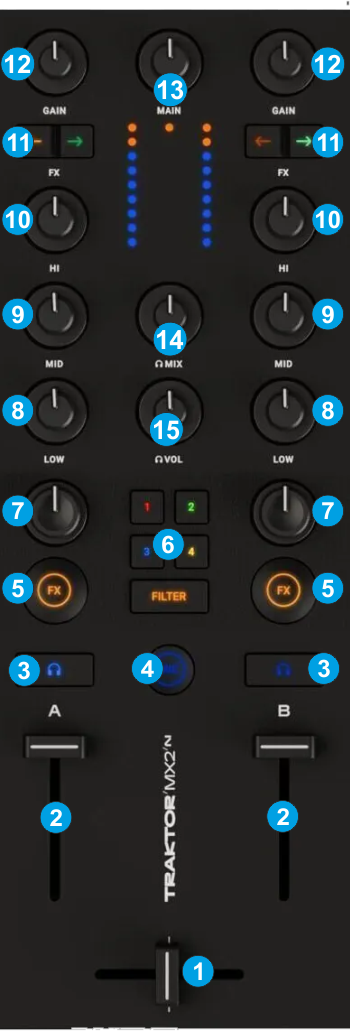
CROSSFADER: Blends audio between the left and right channels/decks.
VOLUME: Adjust the output volume of each deck
PFL: Press this button to send this channel's pre-fader signal to the Cue Channel for monitoring. When engaged, the button will be lit.
Hold SHIFT down and then press this button, to toggle between Frequency and Stems mode for each Deck individually. When in Stems mode, the led will be lit in purple color while SHIFT is held down
MIC: Use this button to turn the Microphone Input On/Off. When engaged, the button will be lit. This button will not perform any action if a Mic input is not configured in Audio Setup of VirtualDJ.
COLOR FX ON: Enable/disable the selected Color FX on each Mixer channel. When disabled, no Color FX will be applied, regardless the position of the FILTER knobs.
COLOR FX SELECT: Use these 5 buttons to select a pre-defined Color FX. 1 : Echo Color FX 2 : Loop Roll Color FX 3 : Cut Color FX 4 : Pitcht Color FX FILTER: High/Low-Pass Filter The buttons 1 to 4 can be assigned to a different Color FX. See Controller Settings
COLOR FX KNOB: Apply the selected Color FX to a Mixer channel. No Color FX is applied (off) when the knob is at the center/middle position
EQ LOW: Adjusts the low (bass) frequencies of the corresponding deck.
EQ MID: Adjusts the middle (mid) frequencies of the corresponding deck
EQ HI: Adjusts the high (treble) frequencies of the corresponding deck.
FX ASSIGN: Press the left arrow button to load the Effects that are saved in 1st FX Bank to left or right Deck. Press the right arrow button to load the Effects that are saved in 2nd FX Bank to left or right Deck. Hold SHIFT down and press the left arrow button to save the Effects assigned to FX Slot 1 to 3 of Left Deck to the 1st FX Bank Hold SHIFT down and press the right arrow button to save the Effects assigned to FX Slot 1 to 3 of Left Deck to the 2nd FX Bank