


DJControl T10
INPUTS & SETTINGS
MIC/AUX Inputs & RECORDING
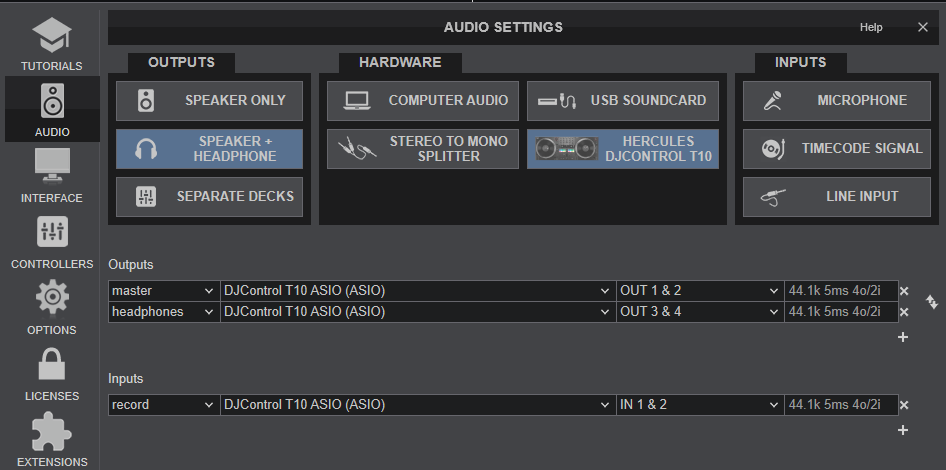
The Hercules DJControl T10 offers a MIC Input to connect a Microphone, along with an AUX input to connect any other Media sources (connections at the rear panel) . The signals of these inputs routed directly to the Master Output but not part of the USB audio interface so should not be added added to the Audio setup of VirtualDJ.
However, both MIC and AUX Inputs can be recorded along with your mix, using the dedicated Record input of the USB Audio interface of the T10, and this is included to the default Audio Setup of VirtualDJ. If for some reason this input is removed from the Audio Setup or use some other sound card for Master Output, the recording in VirtualDJ will not include the audio signal of these inputs.
T10 Settings
The T10 - specific setting is available only when the T10 is connected. Go to VirtualDJ OPTIONS tab and select the CONTROLLER category. See the settings at the top of the list.
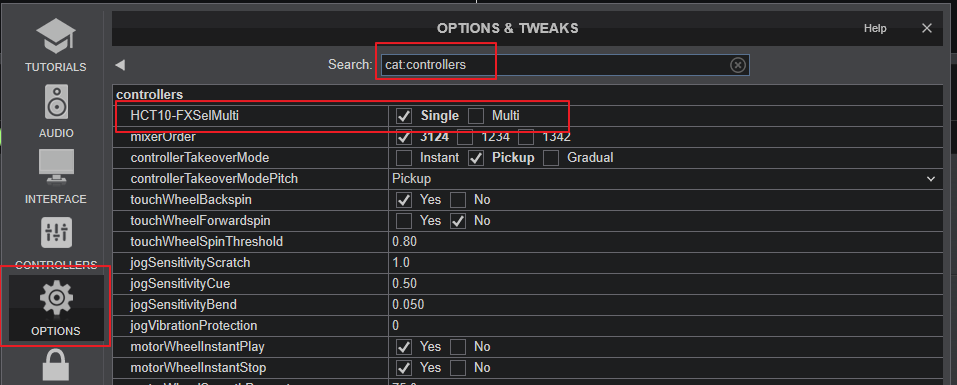
FXSelMulti : When set to Single (default), the 6 FX Arm buttons will work as "solo", so only 1 FX Slot can be armed. Select "Multi" if you need to apply more than 1 FX at the same time.